The iOS 26.6 update brings a mix of security fixes, bug fixes, and performance improvements for iPhone users. While it is not a major feature release, Apple has addressed issues concerning WebKit, the kernel, and image processing. Some users have also reported improved battery life and reduced device heating after installing the update.
The question remains whether iOS 26.6 is actually worth installing. Here’s what’s new, what Apple fixed, and what you should know before updating.
Should You Update to iOS 26.6?
If you’ve been delaying the iOS 26.6 update, it’s important to know the details before deciding. This is a maintenance release, not a feature drop, and that is exactly why it matters.
Apple used this update to patch close to 90 security loopholes across the system, several of which experts say could be triggered remotely without any user error. Users have reported that the battery drain and overheating problems from the previous update (iOS 26.5.2) have eased up, and there is little reason to wait.
Selected users having second thoughts about the update have been relying heavily on Shortcut automations. Many of those automations have broken after installing this update.
Source: AppleClub – Threads
What’s New in iOS 26.6
Many users have been asking what is new in iOS 26.6. Well, the honest answer is: not much, on the surface. Apple’s own release notes for this version are short, and that is worth saying plainly rather than padding them out. The list of genuine iOS 26.6 features comes down to two usage-related changes:
- Blocked Contacts Alert: Did you know your iPhone caps your blocked list at roughly 20,000 numbers? Previously, if you hit this limit, your phone would silently fail to block new callers. iOS 26.6 introduces a clear “Blocked Contacts Limit Reached” alert, giving you a helpful reminder to clean out ancient spam numbers before adding new ones.
- Spotlight Index Optimization: This one sounds technical because it is, but it matters more than the Blocked Contacts change. More on that below.
Moreover, a warning about potentially malicious iMessages, offering you the option to report the message to Apple or dismiss it, was reported in pre-release coverage.
Whether that specific warning shipped in the exact form described is not confirmed on Apple’s own release documentation, so treat it as a feature to watch for rather than a confirmed one.
One feature that has not clearly surfaced as a usage-related part of iOS 26.6 is anti-theft snatch protection, given that reports about its status have differed. That correction gets its own section below because it has been misunderstood numerous times.
Why the Spotlight Indexing Change Actually Matters
Apple describes the Spotlight change as an optimization to the search index. In plain terms, Spotlight is the system that lets your iPhone search across apps, messages, files, and settings from one box. Re-indexing it now, ahead of a major release, is groundwork.
The next update (iOS 27) is expected to lean heavily on an upgraded Siri that understands context across your apps and files. This kind of on-device intelligence needs a fast, well-organized index to draw from.
Apple is quietly doing that heavy lifting in iOS 26.6 so iOS 27 does not have to do it cold. It is not a feature you will notice quickly, but it is the clearest hint in this release about what iOS 27 will actually be built to do.
Anti-Snatching Feature Hasn’t Surfaced as a Usage-Related Feature
An anti-snatching feature, designed to make it harder for a thief to grab your phone and immediately disable Find My or change your Apple ID password, did appear in the iOS 26.6 beta coverage.
However, it has not clearly surfaced as a usage-related feature in the final release. Apple has not officially confirmed or denied whether the feature shipped in some form, and reports from other sources have differed. It is safer to treat the feature’s status as unclear rather than confirmed.
iOS 26.6 Security Fixes
This is the part that actually matters. iOS 26.6 security fixes number close to 90 across the operating system, and Apple deliberately keeps the technical detail thin at first, giving users time to update before attackers can reverse-engineer the specifics from the patch notes.
Out of 90 fixes, 19 of them address issues in the kernel, the core layer of the operating system that controls how apps communicate with hardware and with other apps. Security experts note that most kernel bugs still require an attacker to already have code running on your device, which limits their use.
Here are five security vulnerabilities fixed by the iOS 26.6 update:
| CVE | Component | What It Could Have Allowed |
| CVE-2026-64730 | WebKit (Safari’s engine) | A malicious website could visually fake another site’s interface, tricking you into trusting a fraudulent page |
| CVE-2026-64735 | Kernel | A remote attacker could potentially bypass network filtering protections |
| CVE-2026-64721 | Kernel | An app could access sensitive user data it should not have permission to reach |
| CVE-2026-43810 | Kernel | Memory corruption notable because it could be triggered remotely, not just by a malicious app already on the device |
| CVE-2026-43818 | ImageIO | A specially crafted image file could lead to arbitrary code execution just by being processed |
ImageIO, for instance, is the system Apple uses to decode photos and images across the entire OS, from Messages previews to Safari. A flaw in this system is dangerous because just viewing a malicious image can trigger the overflow, leading to remote code execution (RCE).
Additionally, a critical WebKit memory corruption bug (CVE-2026-64757) was quietly closed. Because WebKit powers Safari and every single in-app browser view on your phone, closing these vulnerabilities cuts off targeted exploit campaigns before they can ever pick up steam.
Source: SQ Magazine
Why the WebKit Fixes Are the Real Reason to Update
Amongst all the security fixes provided by the iOS 26.6 update, security experts have singled out WebKit fixes to prioritize. WebKit is the engine behind Safari and every in-app browser view on iOS, which makes it one of the most attractive security targets on the platform.
According to Forbes’ coverage of the update, browser engine flaws are the raw material for targeted spyware campaigns before they eventually get documented and filter down into more common attacks. Updating promptly closes that window before the technical details become public knowledge.
iOS 26.6 Battery Drain: What Users Are Reporting
If your phone ran hot and drained fast on iOS 26.5.2, there is finally some good news. Widespread user reports have described iOS 26.6 resolving much battery drain and overheating problems.
Moreover, several users have reported that their Apple devices that previously felt warm to the touch have been running cool again during normal use after installing the iOS 26.6 update. This lines up with coverage from other sources tracking the same pattern.
However, a minority of Apple users have also reported no meaningful change after installing the update. Apple has not issued an official statement confirming a battery fix, so it is important to treat this as a widely reported user experience rather than a company-confirmed patch note.
If your battery is still draining fast a week after updating, a restart and a check of Settings > Battery for a runaway app is worth doing before assuming the update itself is the problem.
Known iOS 26.6 Problems to Watch For
No update is completely clean, and the following iOS 26.6 problems are worth knowing before you install the update:
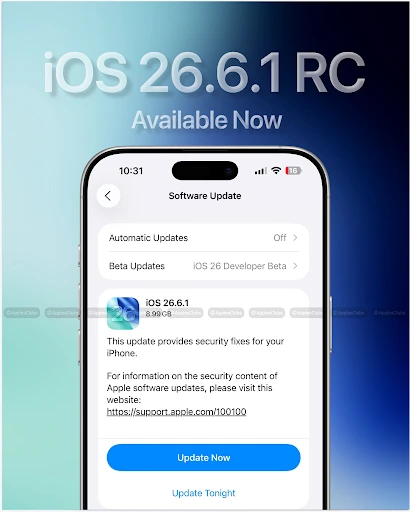
- Shortcuts automations breaking: Users have reported that some Shortcuts automations have stopped triggering correctly since iOS 26.6. A widespread glitch has caused personal automations to stop triggering correctly. While many expected Apple to deploy a patch in the subsequent iOS 26.6.1 update, that release focused primarily on critical security fixes, leaving the automation engine unfixed.
- iCloud Private Relay IP leak: In early August, security researchers discovered a major flaw where certain WebKit features (like Passkey authentication requests) bypassed iCloud Private Relay, exposing users’ real IP addresses. While early reports stated Apple had no timeline for a fix, Apple quietly patched this vulnerability in the iOS 26.6.1 update.
Where iOS 26.6.1 Stands Right Now
While iOS 26.6 unfortunately introduced a frustrating bug that broke personal Shortcuts automations, Apple moved fast to deploy a permanent solution. The subsequent iOS 26.6.1 public update completely resolves these automation engine glitches, restoring background triggers to normal.
Beyond repairing your shortcuts, iOS 26.6.1 acts as an essential security shield. It packs 29 urgent security patches under the hood, including a vital fix for a quiet iCloud Private Relay flaw that was accidentally leaking real user IP addresses.
To completely bypass the initial software bugs and lock down your device privacy, skipping straight past 26.6 to iOS 26.6.1 is highly recommended. You can pull down the polished patch right now via Settings > General > Software Update.
iOS 26.6 Supported Devices
Wondering if your gear makes the cut? If your device is already running iOS 26, you’re in the clear. Apple didn’t drop the axe on any hardware with this point release. Here is the official roll call for iOS 26.6 supported devices:
iPhone: iPhone 11 and later.
iPad: iPad Pro 12.9-inch (3rd generation), iPad Pro 11-inch (1st generation), iPad Air (3rd generation), iPad (8th generation), and iPad mini (5th generation).
If your device supports iOS 26, it supports iOS 26.6. There is no narrower cutoff this time around.
Holding onto older hardware? Don’t worry, Apple hasn’t abandoned you. Alongside iOS 26.6, Apple quietly rolled out a parallel iOS 18.7.10 legacy update. This means even if your phone can’t run the latest OS generation, you still get a critical shield against active exploits.
The rest of the Apple ecosystem got a security tune-up on the exact same day, dropping macOS Tahoe 26.6, macOS Sequoia 15.7.8, macOS Sonoma 14.8.8, tvOS 26.6, watchOS 26.6, and visionOS 26.6. It’s a massive sweep, packing nearly 90 security patches under the hood across the entire product lineup.
How to Update to iOS 26.6
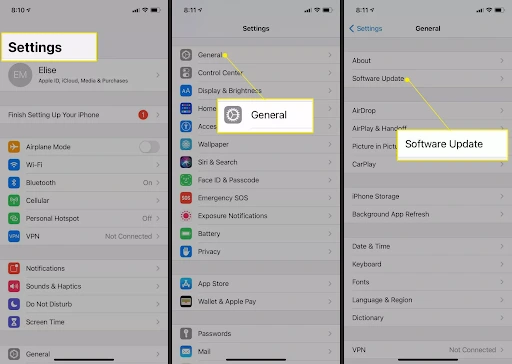
Updating takes a few minutes if your phone has room and a decent battery charge. It’s also a good time to back up your iPhone to a Mac first, just in case. Complete the update by following these steps:
- Open Settings, then tap General.
- Tap Software Update and wait for your phone to check in with Apple’s servers.
- If iOS 26.6 appears, tap Download and Install.
- Enter your passcode if prompted, and keep your phone connected to Wi-Fi and, ideally, a charger until it finishes.
Source: Lifewire
If the update fails partway through, restart your iPhone and try again before assuming something is wrong. A stuck download is usually a connectivity hiccup, not a corrupted install.
If it keeps failing, check Settings > General > iPhone Storage first. Apple typically needs several gigabytes of free space to stage an update even though the final install is smaller. A quick pass to free up storage on your iPhone before you start can save you the trouble.
What’s Coming in iOS 27
We know that iOS 27 deserves its own full guide rather than a rushed mention here: iOS 27 is expected in September 2026 and is already in developer and public beta. Reported headline changes include a significantly upgraded Siri built around Apple Intelligence, and new child safety tools.
None of this is final until Apple ships it, so treat every detail floating around right now as a beta-stage report rather than a confirmed feature. We’ll break down iOS 27 in full once it’s out of beta.
Frequently Asked Questions
Can I download iOS 26.6 over cellular data?
Yes, if you have an iPhone 12 or newer utilizing a 5G network, you can bypass the traditional Wi-Fi requirement entirely. Simply head to Settings > Cellular > Cellular Data Options > Data Mode and switch it to Allow More Data on 5G to open up the download pipeline.
Why didn’t Automatic Updates install iOS 26.6 overnight?
Apple rolls out automatic updates in phased stages to prevent server overload. You can skip the queue anytime by installing it manually in Settings > General > Software Update.
Can I downgrade to iOS 26.5.2 if I dislike this update?
Unfortunately, that window has slammed shut. Apple aggressively closes the security loop by revoking the digital signature for older firmware within a week or two of a new drop. Once Apple stops signing an older version, your phone will reject the installation file, forcing you to stay on the newer software.
Will iOS 26.6 lower my Battery Health percentage?
It won’t harm your physical battery, but the update forces a system recalibration that may reveal capacity drops that had already occurred naturally.
Should I update my Apple Watch alongside my iPhone?
It’s not mandatory, but it is highly recommended. Keeping your Apple Watch on an older version can cause notification sync delays and increased battery drain until both devices are updated.
Note: All prices mentioned are in USD and correct as of the publishing date. Prices may change, and TechWhisp recommends checking directly with the manufacturer or your preferred retailer for the most up-to-date pricing. TechWhisp cannot be held responsible for any price changes after publishing.