The M6 Mac mini starts at $899 and suits most buyers, while the $1,699 M5 Pro model targets sustained professional workloads needing over 32GB of memory, Thunderbolt 5, and larger local AI models. Choose based on memory needs, not price.
Short on time? Here is the verdict up front:
- First-time Mac buyers and everyday users: the M6 Mac mini with 16GB memory and 512GB storage. That configuration covers browsing, office work, and light creative projects without overspending.
- Video editors, 3D artists, and AI tinkerers: the M5 Pro with at least 48GB of memory. Anything less and you will feel the ceiling within a year.
- Current M4 Mac mini owners: skip this generation unless your workload has genuinely outgrown it. The jump is real, but it is not urgent.
- Anyone who needs to work from a coffee shop, a train, or a couch: skip the mini entirely and get a laptop instead, since it has no screen, keyboard, or battery of its own.
Naming Is Backwards, But Why
Apple’s naming here trips up almost everyone, so let’s clear it up before anything else. The entry-level Mac mini runs the all-new M6 chip. The pricier, more powerful model runs the M5 Pro. That means the cheaper machine carries the higher chip number, which reads like a typo but is not one.
The lineup skips a base M5 chip, taking the entry Mac mini directly from M4 to M6 alongside the M5 Pro. The M5 Pro, meanwhile, is the same chip family that debuted in the 2026 MacBook Pro, adapted here for sustained desktop workloads.
So when you compare the two, ignore the numbers and compare what each chip is built for: M6 is the fast, efficient generalist, and M5 Pro is the workhorse for jobs that run for hours at a time.
On the Mac mini M6 release date: Apple announced both models on August 25, 2026, with pre-orders open the same day. Deliveries and in-store availability begin September 22, 2026.
If you customize memory, storage, or Ethernet, your checkout screen may show a later delivery estimate than that general date, and that specific date matters more than the headline one, so check it before you commit to a config.
What You Get
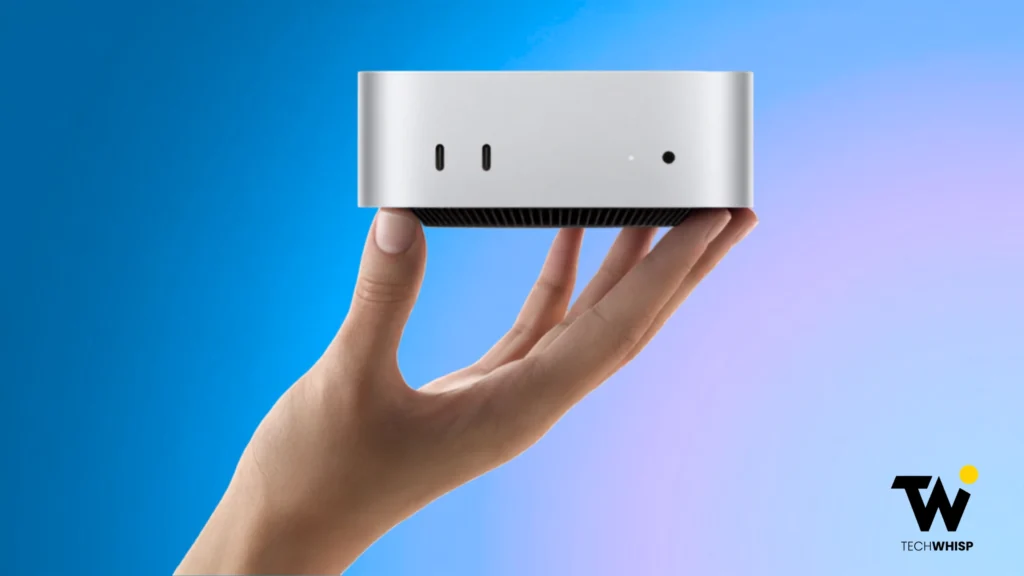
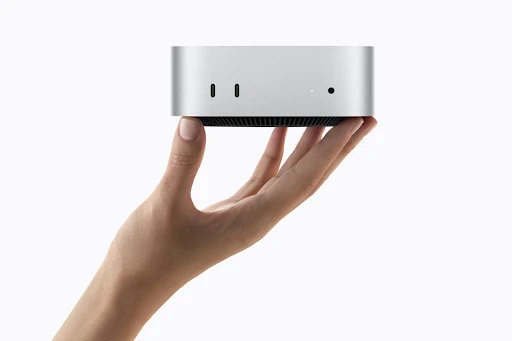
Both machines share the same tiny aluminum enclosure Apple introduced in 2024: five inches square, two inches tall, and about 1.5 pounds for the M6 model or 1.6 pounds for M5 Pro. What changed is what’s inside it. Here’s the full side-by-side on M6 Mac mini specs versus M5 Pro.
| Spec | Mac mini (M6) | Mac mini (M5 Pro) |
| Chip | Apple M6 | Apple M5 Pro |
| CPU cores | 15-core standard (5 super, 6 performance, 4 efficiency), configurable to 18-core | 15-core standard (5 super, 10 performance), configurable to 18-core (6 super, 12 performance) |
| GPU cores | 12-core with ray tracing & Neural Accelerators | 16-core standard, configurable to 20-core with ray tracing |
| Base unified memory | 16GB (configurable to 24GB or 32GB) | 24GB (configurable to 48GB or 64GB) |
| Base storage | 256GB SSD | 512GB SSD |
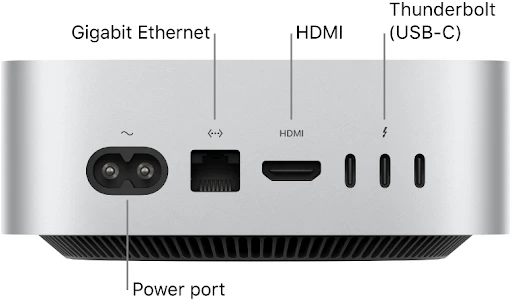
| Ports | 2x USB 3 (10Gb/s front), 3x Thunderbolt 4, HDMI, Ethernet (rear) | 2x USB 3 (10Gb/s front), 3x Thunderbolt 5, HDMI, Ethernet (rear) |
| Starting price (US) | $899 ($799 education) | $1,699 ($1,599 education) |
What’s Actually New Versus the M4 Mac mini
If you’re comparing Mac mini M6 vs M4, the honest summary is: more cores, a much stronger AI engine, and faster storage and memory bandwidth, all in the identical case.
M6 packs a 12-core CPU (two more cores than M4) built around Apple’s first super cores for faster single-threaded work, plus a 12-core GPU with hardware-accelerated ray tracing and, for the first time on a Mac mini, Neural Accelerators baked into each GPU core.
Pair that with the new Dual 16-core Neural Engine exclusive to the M6, and Apple claims up to 4x faster AI performance, up to 2x faster graphics, up to 2x faster storage, and 40 percent faster CPU performance compared with the outgoing M4 model.
One wrinkle: M6’s memory bandwidth isn’t flat across configs. Only the base 16GB model is capped at 153GB/s; stepping up to either the 24GB or 32GB tier unlocks the full 170GB/s. The M5 Pro, by contrast, runs a flat 307GB/s regardless of memory tier.
Those are Apple’s own benchmark figures, based on internal testing conducted in July 2026, not independent test results, so treat them as a ceiling rather than a promise.
Source: Apple (Image © Apple Inc. Used for commentary/review purposes)
Which Configuration to Buy
M6 Mac mini buyers face three real decisions: chip, memory, and storage. Two of those you can fix later. One you cannot.
Chip: M6 or M5 Pro?
On M6 Mac mini vs M5 Pro, most people should default to M6. It handles browsing, office apps, photo editing, coding, and even moderate video work without breaking a sweat, and reviewers who’ve spent time with both chips generally point everyday buyers toward it.
The MacBook Pro M5 is another option for professionals who need strong performance but also need to work away from a desk.
Reach for M5 Pro specifically if you need more than 32GB of memory, want Thunderbolt 5’s bandwidth of up to 120Gb/s for external storage or display clustering, plan to run larger local AI models, or you do sustained professional work like long render queues or multi-track audio sessions where the machine runs flat out for hours.
Note that the entry $1,699 M5 Pro configuration comes with 15 CPU cores and 16 GPU cores, not the maxed-out 18/20-core chip; that upgrade costs $200 more.
Memory: The One Decision You Cannot Undo
This is the section to actually slow down and read. The M6 Mac mini memory is unified and integrated directly into Apple’s system-on-chip architecture. It is not a stick you can pop in later, and there is no upgrade path, no third-party kit, and no repair shop workaround. Whatever you choose at checkout is what that machine has for its entire life.
The base M6 configuration ships with 16GB, configurable to 24GB or 32GB. If your workload is browser tabs, documents, and light photo work, 16GB is genuinely fine.
But if you routinely run several pro apps at once, keep dozens of tabs open while editing video, or want headroom for on-device AI tools, spend the extra money and go to 24GB now. That 24GB step also unlocks the full 170GB/s memory bandwidth, not just extra headroom, the base 16GB tier is the only one capped at 153GB/s.
It is far cheaper to add memory at purchase than to replace an entire computer in eighteen months because you guessed wrong. The M5 Pro starts at 24GB and scales to 48GB or 64GB, and reviewers plus long-time Mac mini owners on forums like r/macmini consistently name undersized memory as the single regret that shows up most often after the fact.
Storage: Usually the Smaller Spend
While the internal SSD itself is non-upgradable after purchase, you can easily add terabytes of high-speed external storage using the rear ports, often for a fraction of Apple’s internal storage upgrade pricing.
Unless you need the absolute fastest possible scratch disk for professional video work, buy the smallest storage tier you can tolerate and put the savings toward memory instead.
For the best Mac mini configuration for most people, that means the base M6 chip, 24GB of memory if your budget allows it, and 512GB of storage, backed by an external drive for anything larger.
Source: Apple
What to Add
Connectivity is genuinely upgraded across the board. Both chips now support Wi-Fi 7 and Bluetooth 6 through Apple’s N1 wireless chip, and 2.5Gb Ethernet is standard rather than a paid extra, with 10Gb configurable if you need it.
On the front, both models feature two convenient USB 3 ports (up to 10Gb/s). Around back, the M6 model features three Thunderbolt 4 ports (up to 40Gb/s), while the M5 Pro steps up to three Thunderbolt 5 ports offering up to 120Gb/s with Dynamic Bandwidth Boost.
Apple also added genlock support through USB-C for camera synchronization, though that only matters if you shoot video professionally.
Hidden Cost People Often Skip
Here’s the number that rarely makes it into a Mac mini review: the box contains no display, keyboard, mouse, or webcam. Budget roughly $150 to $300 for a basic monitor, keyboard, and mouse combo from a third party, or $1,500 and up if you want Apple’s own Studio Display and Magic accessories.
That means the realistic entry price for a usable M6 Mac mini price is closer to $1,050 to $1,200 once you account for a screen and input devices, not the $899 sticker price alone. Factor that in before you compare the mini’s price against a laptop, which already includes all three.
Who Should Not Buy a Mac Mini
Two groups should look elsewhere. If you need to work away from a desk, a Mac mini is the wrong shape entirely, since it is a desktop with no screen, keyboard, or battery of its own; a MacBook Air M5 is the better fit.
If your workload genuinely exceeds even a maxed-out M5 Pro, meaning you routinely juggle massive video timelines, huge 3D scenes, or memory-hungry local AI models well past 64GB, look at the Mac Studio instead.
It shares the same design language but scales up to an M5 Max or M5 Ultra chip with far more memory and bandwidth headroom, at a proportionally higher price. Most people never need that ceiling, but if you already know you do, it is worth the jump rather than fighting the mini’s limits.
For creative professionals specifically, the Mac mini M6 for video editing is a genuinely capable pairing. Apple’s official benchmarks show the M6 delivering significantly faster export speeds and timeline rendering compared with the M4, making it well suited to multi-stream 4K workflows in Final Cut Pro.
Push into color-graded 8K or multi-camera ProRes RAW work, though, and the M5 Pro’s extra memory and Thunderbolt 5 bandwidth for external storage start to matter.
Choosing between a MacBook Pro and Mac mini ultimately depends on whether portability or a permanent desktop setup matters more to your workflow.
Should M4 Mac Mini Owners Upgrade?
For most current M4 owners, the honest answer is no. The M4 Mac mini is barely two years old, still fast for everyday work, and the generational leap, while real on paper, will not be felt in day-to-day browsing, email, or office tasks.
The upgrade makes sense if you specifically need the new AI acceleration for on-device model work, you’re bottlenecked by 16GB of memory today, or you want Thunderbolt 5 and the M5 Pro’s extra cores for a professional workload you’ve outgrown your current machine on. Otherwise, save the money and wait for the generation after this one.
Where to Save Money
A few ways to bring the price down without compromising the configuration advice above: students, educators, and staff qualify for education pricing at $799 for M6 and $1,599 for M5 Pro. Apple’s certified refurbished store periodically lists open-box units at a discount once initial stock has moved.
If your workload genuinely fits within what the outgoing M4 Mac mini already offers, buying that model while retailers clear remaining stock can be the smartest financial move of all, memory ceiling aside.
The Verdict
On Is the M6 Mac mini worth it, yes, decisively, for the audience it’s built for. The M6 Mac mini at $899 is the best value entry point into the Mac desktop lineup Apple has offered in years, as long as you spend the extra money on memory rather than storage and go in knowing the monitor, keyboard, and mouse cost extra.
Reserve the M5 Pro for workloads that genuinely need more than 32GB of memory or Thunderbolt 5’s bandwidth. Get the memory decision right, and everything else about this machine is easy to like.
Frequently Asked Questions
Can the M6 Mac mini run Windows?
Not natively through Boot Camp, which is limited to Intel-based Macs. Running Windows on Apple silicon requires virtualization.
Does the Mac mini have a built-in speaker?
Yes. Mac mini models include a built-in speaker for basic audio, although external speakers are better for media use.
Can I use an external GPU with the M6 Mac mini?
No. Apple’s eGPU support is designed for Intel-based Macs, not Apple-silicon Mac mini models.
Can I use a Windows monitor with a Mac mini?
Yes. Most HDMI or compatible USB-C/Thunderbolt monitors work without needing an Apple display.
Is a Mac mini good for gaming?
It can handle supported Mac games well, but game availability is still more limited than on Windows PCs.
Note: All prices mentioned are in USD and correct as of the publishing date. Prices may be subject to change, and TechWhisp recommends checking directly with the manufacturer or your preferred retailer for the most up-to-date pricing. TechWhisp cannot be held responsible for any price changes after publishing.