macOS 27 Golden Gate is Apple’s free Mac update, released September 14, 2026. It runs only on Apple Silicon, leaving Intel Macs behind. Siri AI arrives too, though the fastest voice features need an M3 chip and 12GB of memory.
Two questions matter today: can your Mac install this update, and should it? For Apple Silicon owners, the answer to the first question is almost always yes.
For Intel owners, it’s a flat no, and no amount of waiting changes that. This guide walks through what’s new, who gets it, and how to install it without losing anything.
Can Your Mac Run macOS 27 Golden Gate?
If your Mac runs on Apple silicon, you can install macOS 27 Golden Gate today. If it still runs an Intel chip, you can’t, and that single fact decides everything else in this guide.
Apple’s list of macOS 27 compatible Macs covers every M1-or-later machine, plus the new MacBook Neo, which uses an A18 Pro chip instead of an M-series chip.
| Mac | Earliest model that runs macOS 27 Golden Gate |
| MacBook Neo | 2026 and later (A18 Pro chip) |
| MacBook Air | 2020 and later (M1 chip or newer) |
| MacBook Pro | 2020 and later (M1 chip or newer) |
| iMac | 2021 and later (M1 chip or newer) |
| Mac mini | 2020 and later (M1 chip or newer) |
| Mac Studio | 2022 and later (M1 Max chip or newer) |
| Mac Pro | 2023 and later (Apple silicon) |
Every Mac on that list also gets Apple Intelligence and standard Siri AI. But the sharpest Siri voice and dictation model is pickier.
It needs an M3 chip or newer, with at least 12GB of memory. We break down that split in the Siri AI section below.
macOS 27 Intel support does not exist. This is the first version of macOS built only for Apple silicon.
Four Intel Macs that could still run last year’s macOS 26 Tahoe are left behind: the 16-inch MacBook Pro (2019), the 13-inch MacBook Pro (2020, with four Thunderbolt 3 ports), the 27-inch iMac (2020), and the Mac Pro (2019).
Apple says these machines will keep getting security updates for about three years, but they won’t get new features again. Golden Gate is also the last macOS with full Rosetta 2 support, the tool that lets Apple silicon Macs run older Intel-only apps.
If your work depends on one of those apps, this update is your last easy way to keep using it.
When Did macOS Golden Gate Release?
The macOS Golden Gate release date was Monday, September 14, 2026. Apple shipped it the same day as iOS 27, iPadOS 27, watchOS 27, tvOS 27, and visionOS 27, and it’s a free update for every eligible Mac.
iOS 27 brings its own set of changes to the iPhone, which TechWhisp covers in our full iOS 27 guide.
What’s New in macOS 27 Golden Gate
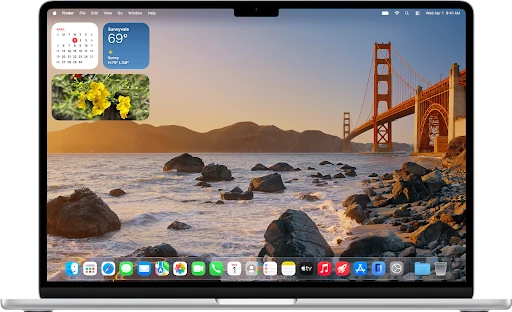
The macOS 27 features list is long, but most of it falls into three buckets: a smarter Siri, upgraded built-in apps, and a calmer take on last year’s glass-heavy design.
Most of these upgrades run on macOS 27 Apple Intelligence, Apple’s umbrella term for its on-device and cloud AI models.
Smarter Apps Across the Board
Safari now groups related tabs into topics automatically, so a messy window sorts itself out. A new Notify Me tool watches a page and tells you when it changes.
An AI extension builder can write simple Safari extensions from a plain-language prompt. Photos gains Spatial Reframing and an Extend tool that stretches an image beyond its original edges.
Messages and Mail get personalized Smart Reply suggestions plus faster search. Spotlight is rebuilt for speed, and it now doubles as the front door to Siri AI, which we cover next.
The Passwords app also flags weak or reused passwords and can update some of them for you automatically. For the complete official rundown, see Apple’s macOS page.
A Calmer Liquid Glass and Fixed Window Corners
Golden Gate adds a transparency slider for the Liquid Glass interface Apple introduced last year, letting you choose a more see-through look or a more opaque, easier-to-read one. It’s a direct answer to complaints about macOS 26’s glassy panels being hard to read.
Window corners also go back to a fixed radius across every app, reversing the dynamically changing corners macOS 26 introduced.
Rounding out the release: expanded child-safety tools, richer VoiceOver image descriptions, automatic captions for videos that don’t have them, and general performance work Apple says makes the whole system feel snappier.
Source: Apple Support (Image © Apple Inc. Used for commentary/review purposes)
Siri AI on the Mac
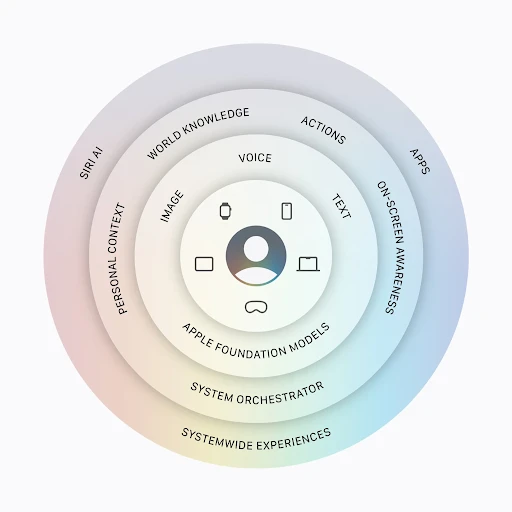
Siri AI Mac support is the headline feature this year. The new Siri is conversational, built into Spotlight, and aware of what’s on your screen and inside your files.
Ask it a question, and it can pull answers from your messages, mail, and photos, or carry out a task inside an app without you clicking through it yourself. A new standalone Siri app keeps a record of past conversations, synced across your Apple devices through iCloud.
Every Apple silicon Mac gets this baseline Siri AI and Apple Intelligence. But the most expressive voices and the sharpest dictation model sit behind extra hardware: an M3 chip or newer, with at least 12GB of unified memory.
If your Mac runs an M1 or M2 chip, or has 8GB of memory, you still get Siri AI, just not the top-tier voice model.
Apple is rolling Siri AI out as an English-first beta, with more languages landing in October and China excluded entirely. EU regulators and Apple are still at odds over Siri AI on iPhone, iPad, and Apple Watch there, but that fight doesn’t extend to the Mac, so EU users get Siri AI on Golden Gate just like everyone else.
Early owner reports on Reddit’s r/mac and r/MacOS communities describe Siri AI as noticeably quicker to respond than the old Siri, though a few threads mention it occasionally misreading on-screen context inside busy apps.
Several posters also say switching the Liquid Glass slider toward a more opaque setting made text easier to read on external monitors. A handful of early adopters flagged short app-launch slowdowns right after installing, which cleared up after a restart.
Source: WIRED
How to Update to macOS 27 Golden Gate
Let’s find out: how to update to macOS 27 starts with a backup, not the install button. Plug in an external drive and run Time Machine, or use another backup tool you trust, especially if you rely on your Mac for work or run specialist software.
Once the backup is done, here’s the process:
1. Open the Apple menu and choose System Settings.
2. Click General in the sidebar.
3. Click Software Update.
4. When macOS 27 Golden Gate appears, click Update Now, enter your administrator password, and let the Mac restart on its own a few times.
For the full official walkthrough, including what to do if the update doesn’t appear, see Apple’s guide to updating macOS.
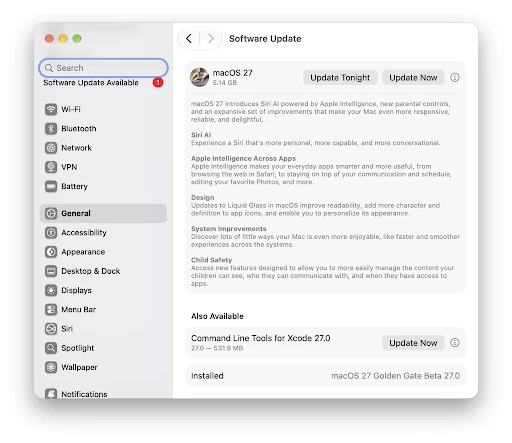
Source: OSX Daily
Should You Update Now, or Wait?
Is macOS 27 worth it? This depends on what you use your Mac for. If you’re not chasing the newest Siri voices, the update is still worth it for the faster Spotlight, the calmer Liquid Glass, and the security fixes alone.
Most Apple Silicon owners can install macOS 27 Golden Gate the day it drops without running into trouble.
macOS Golden Gate vs Tahoe comes down to one decision: whether you’re ready to leave Intel behind. Tahoe was the last release built for both chip families.
Golden Gate is Apple silicon only, faster in daily use, and the first to ship the full Siri AI overhaul. If you’re still on an Intel Mac, this isn’t really a choice; Tahoe is as far as your Mac goes.
A launch-day major macOS update can carry early app-compatibility issues, so if you depend on your Mac for paid work, it’s reasonable to wait a week or two for the first bug-fix release before installing.
If you’re budgeting for new hardware, comparing MacBook Air and Pro can help narrow down your laptop options, while MacBook versus Mac mini focuses on the choice between a laptop and a desktop.
Frequently Asked Questions
Can I try a newer macOS without replacing my current version?
Yes. Install a compatible version on a separate APFS volume and choose which version to start up. This works as a temporary testing setup.
How do I stop receiving macOS beta updates?
Open System Settings > General > Software Update. Click the information button beside Beta Updates and choose Off. This stops future betas; it doesn’t remove your installed version.
Does the installer need internet access after downloading?
Yes. Keep your Mac connected during installation so it can retrieve firmware and other information specific to your model.
What if my Mac doesn’t have enough space for the update?
Free up storage by removing unnecessary files or moving them to an external drive, then retry the installation.
What should I do if installation keeps failing?
Try installing in safe mode or through macOS Recovery. If the problem continues, contact Apple Support for help diagnosing it.
Note: All prices mentioned are in USD and correct as of the publishing date. Prices may be subject to change, and TechWhisp recommends checking directly with the manufacturer or your preferred retailer for the most up-to-date pricing. TechWhisp cannot be held responsible for any price changes after publishing.