

The Mac Studio M5 Max vs M5 Ultra comparison comes down to the biggest difference for most users, which is memory rather than speed. Most creators and developers are likely to choose the M5 Max, considering that the M5 Ultra only justifies its $3,000 price tag for workflows that require 256 GB or more of unified memory.
Apple’s top-tier desktop chips might look similar on paper, but they target drastically different workloads. Doubling your memory bandwidth sounds tempting, but most pro users will hit diminishing returns long before maxing out the base M5 Max.
The Mac Studio M5 lineup keeps the same two-chip split as before. There is an M5 Max version for most buyers and an M5 Ultra version for users looking for higher workload performance.
Reading through the Mac Studio M5 Max specs next to the Ultra’s features, the gap becomes more evident. In practice, the decision comes down to one question. How much memory does your actual work need?
This guide breaks down the specs, prices, and ideal use cases for the Mac Studio M5 Max and M5 Ultra so you can choose the right machine with confidence.
The Quick Verdict
If you edit video, build 3D scenes, write code, or run local AI models, the Mac Studio M5 Max handles almost all of it. Buy the M5 Ultra only if you work with huge files or need more than 128 GB of memory.
Also, consider the Ultra if your professional video setup requires higher GPU performance, unified memory, or additional display outputs.
In the Mac Studio M5 Max vs M5 Ultra comparison, most buyers may walk out with the Max, depending on their workload requirements. That leaves $3,000 to spend on storage or a second display instead.
What Both Machines Share
The Mac Studio 2026 lineup keeps the same small square case, 7.7 inches wide and 3.7 inches high. Both chips use PCIe Gen 6 storage, which processes data up to twice as fast as the last generation.
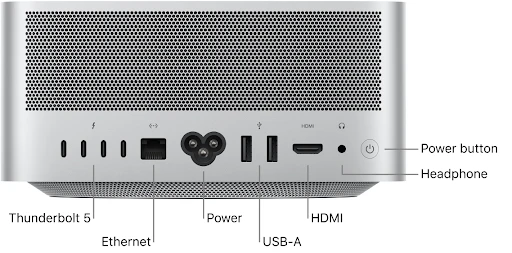
Both models add Thunderbolt 5, offering bandwidth of up to 120 Gb/s through Bandwidth Boost, along with Wi-Fi 7, Bluetooth 6, and Genlock support for professional video synchronization.
M5 Max
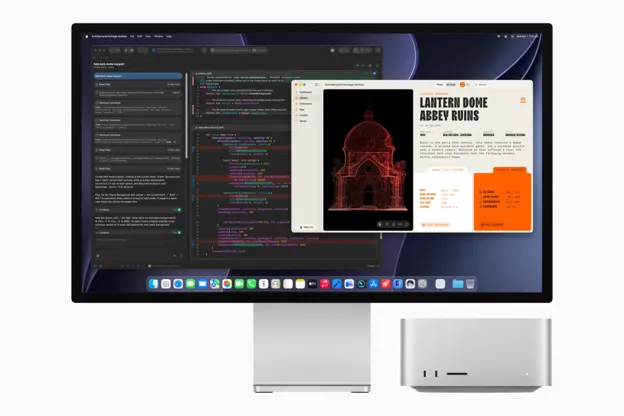
- Supports up to five external displays, including four displays at up to 6K at 60 Hz, plus a fifth display at up to 5K at 60 Hz over HDMI.
- Alternatively, it can support up to three displays, including two displays at up to 8K at 60 Hz and a third at up to 5K at 60 Hz over HDMI.
M5 Ultra
- Supports up to eight displays at 6K at 60 Hz.
- Alternatively, it can support up to four displays at 8K at 60 Hz.
Source: Apple
M5 Max vs M5 Ultra Specs Comparison
Here is how the two Mac Studio configurations compare on paper. The price and memory specs matter most, since they have the biggest impact on performance, workload capacity, and overall value.
| Spec | M5 Max | M5 Ultra |
| CPU cores | 18-core CPU (6 Super Cores + 12 Performance Cores) | 30-core CPU with 10 Super Cores and 20 Performance Cores; configurable to a 36-core CPU with 12 Super Cores and 24 Performance Cores |
| GPU cores | 32-core, up to 40-core | 64-core, up to 80-core |
| Unified memory | Starts with 36 GB; configurable to 48 GB, 64 GB, or 128 GB with the 40-core GPU configuration | Starts with 96 GB; configurable to 256 GB or 512 GB with the 36-core CPU and 80-core GPU configuration |
| Memory bandwidth | Up to 614 GB/s | Up to 1.2 TB/s |
| Starting storage | 512 GB SSD | 1 TB SSD |
| Display support | Up to five external displays, including four at 6K and one at 5K; alternatively, up to three displays, including two at 8K and one at 5K | Up to eight 6K external displays or up to four 8K displays |
| Starting price (US) | $2,499 | $5,499 |
Pricing and Value
Let’s talk about the Mac Studio M5 Ultra price first, because the price has skyrocketed. Apple raised the base Mac Studio from $1,999 to $2,499 back in June 2026.
The M5 Max now starts at $2,499, with education pricing from $2,299. The M5 Ultra starts at $5,499, with education pricing from $5,099. That is $1,500 more than the M2 Ultra cost at launch.
Apple attributed the price increase to higher memory costs. Regardless of the reason, the higher starting price makes overall value and configuration choices more important for buyers.
For context, a fully loaded Ultra configuration can cost more than a used car in some markets. Apple has framed the increase as a fair trade for more memory and speed. Whether that trade feels fair is up to your budget, not Apple’s marketing.
Upgrade costs pile up fast too. Early configurator numbers show around $1,300 to jump from the base CPU and GPU to the top chip option.
Moving from 96 GB to 256 GB of memory adds close to $4,000. A loaded 256 GB machine with a 16 TB drive can reportedly hit $18,299. Those figures came from launch-day reports, so check Apple’s store before you buy anything.
Memory Is the Real Dividing Line
Mac Studio unified memory capacity often becomes the defining choice for many buyers. The M5 Max starts with 36 GB of unified memory. The upgraded 40-core GPU configuration can be configured with 48 GB, 64 GB, or 128 GB.
The M5 Ultra starts with 96 GB and can be configured with 256 GB or 512 GB when paired with the upgraded 36-core CPU and 80-core GPU. Memory bandwidth reaches up to 614 GB/s on the M5 Max and up to 1.2 TB/s on the M5 Ultra.
You cannot open the case and add more later. Whatever you pick on day one is what you get for the life of the machine.
For most video editors, 3D artists, and developers, 128 GB covers projects with room to spare. You only need more space if you run huge AI models locally, work with massive uncompressed video files, or juggle dozens of heavy apps at once.
If that is not your workflow, the Ultra’s extra memory just sits there unused, and you paid hefty dollars for headroom you will never touch.
What UltraFusion Actually Means
The M5 Ultra uses Apple’s UltraFusion technology to connect two dual-die M5 Max chips, forming a quad-die architecture.
Its four dies behave as a single unified processor, offering up to a 36-core CPU, an 80-core GPU, 512 GB of unified memory, and 1.2 TB/s of memory bandwidth.
In practical terms, UltraFusion allows the four dies to behave as a single unified processor, giving applications access to the combined CPU, GPU, and memory resources without treating them as separate systems.
The M5 Ultra supports up to 512 GB of unified memory and delivers 1.2 TB/s of memory bandwidth, which Apple describes as 50 percent higher than the M3 Ultra.
Source: Apple
Which One Fits Your Work
Here is how the Mac Studio M5 Max vs M5 Ultra comparison plays out by application:
Video Editing
The M5 Max is likely to answer the question of using the Mac Studio for video editing. Apple’s testing found that the M5 Max delivered up to 3x faster Magic Mask performance in DaVinci Resolve Studio than the M4 Max.
Most editors working in 4K or normal multicam projects will fly through timelines on the M5 Max. Multicam cuts, color correction, and normal export queues all run smoothly.
Go for the Ultra only if your work genuinely needs 256 GB or more of memory, substantially greater GPU resources, or the Ultra’s higher external-display limit.
3D and VFX
3D artists who render big scenes benefit from more GPU cores and memory. If your scenes stay under a few hundred layers and textures, the M5 Max keeps up fine.
Renders that use dense particle systems or heavy simulation caches are where memory pressure shows up first, and that is where the Ultra’s larger pool helps most.
Software Development
Most developers do not need the maximum capabilities of either machine. Compiling large codebases, running containers, and testing apps all fit comfortably within the M5 Max’s 128 GB of memory.
Docker containers, local databases, and multiple IDE windows all run comfortably. Compile times benefit more from fast storage than from extra memory beyond 128 GB.
Note: Teams running huge local databases or many virtual machines at once should consider the M5 Ultra.
Local AI Work
This is where the Ultra shines. With 1.2 TB/s memory bandwidth and support for Apple’s Core AI/MLX frameworks, the Ultra can run massive open-weight models (like 70B+ parameter MoE LLMs) entirely on-device without cloud latency.
Apple’s testing shows major LM Studio prompt-processing gains for both chips, with the M5 Max reaching up to 3.9x the performance of the M4 Max and the M5 Ultra reaching up to 4x the performance of the M3 Ultra.
A 128 GB machine can run mid-size open models comfortably, but the largest local models need the extra headroom the Ultra provides.
If you run large AI models on your own machine, the Ultra’s extra memory gives you more room to handle bigger models and heavier workloads.
Music Production
Most music studios will never touch the limits of the M5 Max. Session counts, plugin loads, and sample libraries fit comfortably inside 128 GB.
Even large music projects with hundreds of instrument tracks usually stay well below 100 GB of memory. Save your money here and put it toward storage or an audio interface instead.
Configuration Within Each Model
Picking the base chip is only half the decision. Apple lets you upgrade CPU cores, GPU cores, memory, and storage inside each model, and those upgrades add up fast.
Early configurator pricing put the jump from the base 18-core CPU and 32-core GPU to the top M5 Max option near $1,300.
Moving from 96 GB to 256 GB of memory can add close to $4,000, more than the price gap between the two base machines.
This means a heavily upgraded M5 Max can end up costing more than a base M5 Ultra, while still giving you less memory ceiling.
Storage upgrades follow the same pattern. Jumping from the base drive to a multi-terabyte SSD costs more. So match your storage plan to your actual project sizes instead of buying headroom you will not use.
Before you configure, decide your memory number first. Then look at what chip and storage fit your budget around it.
Performance in Context
Apple’s figures for the M5 Ultra vs M5 Max performance use different comparison systems depending on the workload.
The company’s launch materials compare selected results with earlier Apple silicon models, including systems featuring the M1 Ultra or M2 Max, as identified in the accompanying benchmark footnotes.
Since the comparison baseline varies between tests, performance multipliers should only be quoted alongside the exact workload, application, and comparison system Apple used.
They should not be presented as direct comparisons with the M4 Max unless Apple’s relevant test notes specifically identify that chip as the baseline.
Apple reports substantial improvements in workloads such as local AI prompt processing, text-to-image generation, machine-learning training, and DaVinci Resolve effects.
However, these figures come from Apple’s controlled pre-release testing rather than independent reviews.
The practical improvement you experience will depend on the Mac you are replacing, your chosen configuration, and the applications you use.
Buyers should therefore compare results against their current system instead of relying on a single headline multiplier.
When the Mac Studio Is More Than You Need
Not everyone spending over $2,500 needs a Mac Studio. If you write documents, browse, edit photos casually, or run light apps, the Mac Mini gives you most of the same chip family for a lot less money.
It skips Genlock support, the high memory capacity, and the extra Thunderbolt bandwidth, but most people are unlikely to need those features.
If you need to carry your machine around, look at other MacBook alternatives instead. And the Mac Pro is gone. Apple discontinued it in March 2026, and the M5 Ultra Mac Studio now sits at the top of the desktop lineup.
Should M1 or M2 Owners Upgrade?
If you bought an M1 Max or M1 Ultra Mac Studio back in 2022, the jump to the M5 generation is real. Apple’s own testing shows multiple times faster performance across video, AI, and image work.
If you own an M2 Max Mac Studio from 2023, the gains are smaller but still solid, especially in AI and video tasks.
Owners of previous Mac Studio models should base the decision on whether their current workloads regularly hit memory or performance limits.
The higher $5,499 starting price of the M5 Ultra makes upgrading difficult to justify unless you specifically need its additional memory, GPU resources, or display support.
If you are still deciding, ask yourself how often you have hit a real performance wall on your current machine. If the answer is rarely, there is no rush.
In a Nutshell
If your main question is ‘which Mac Studio should I buy‘, this Mac Studio M5 Max vs M5 Ultra comparison is a valuable decision-making guide for most video editors, 3D artists, developers, and musicians. For these users, the M5 Max will usually be the more practical choice.
Are you one of those asking whether the M5 Ultra is worth it? Only if your work genuinely needs 256 GB or more of memory, substantially greater GPU resources, or support for more external displays.
For everyone else, this review points to the M5 Max as the more practical option. The money saved can go toward extra storage, a better display, or other upgrades that may have a bigger impact on your setup.
Frequently Asked Questions
Does the Mac Studio come with a keyboard and mouse?
No. Apple sells the Magic Keyboard, Magic Mouse, and Magic Trackpad separately, so add them to your order if you need them.
Can I add an external GPU to a Mac Studio?
No. Apple Silicon does not support external GPUs, so all graphics power comes from the chip you choose at checkout.
How many years of software updates can I expect?
Apple has generally supported Mac Studio models with macOS updates for around seven years, based on past M-series machines.
Is the Mac Studio loud during heavy rendering?
No. Its internal fan design keeps noise low even under sustained load, much quieter than a comparable PC tower.
Does Apple accept my old Mac Studio as trade-in credit?
Yes. Apple Trade In accepts earlier Mac Studio models, and the credit amount depends on the configuration and condition.
Note: All prices mentioned are in USD and correct as of the publishing date. Prices may be subject to change, and TechWhisp recommends checking directly with the manufacturer or your preferred retailer for the most up-to-date pricing. TechWhisp cannot be held responsible for any price changes after publishing.